Card history
Card history shows every saved version of a single card. Open it from the card back section or the board dashboard.
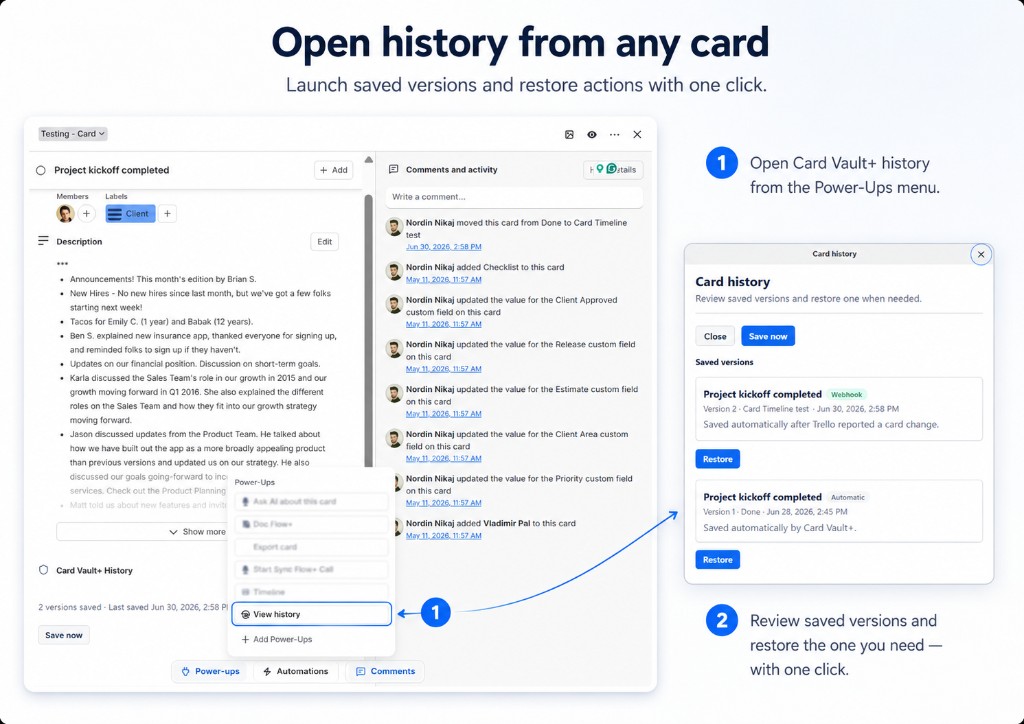
Open card history
From a card (recommended):
- Open the card in Trello
- Find Card Vault+ History on the card back
- Click View history
From the board dashboard:
- Open Card Vault+
- Go to the Protected tab
- Click View history on a card row
What you see
Each saved version shows:
- Version number — newest first
- Source — manual, automatic, webhook, etc.
- List name — where the card lived when saved
- Date saved
The card back section also shows a compact summary (version count and last saved date) without opening the full modal.
Actions
- Save now — capture the current card state immediately
- Restore — open the restore preview for that version
Empty history
If no versions appear:
- Click Save now to create the first snapshot
- Confirm you are authorized and the board is protected
- Wait for automatic snapshots if you rely on scheduled saves
Next: learn how to restore a card from a saved version.