Restore a card
Restore brings saved snapshot content back into Trello. Card Vault+ always shows a preview before writing anything.
Two restore modes
Recreate deleted card
Use when the original card was deleted or is no longer on the board.
- Card Vault+ creates a new Trello card
- You choose the destination list
- The original deleted card is not undeleted — content is copied to a new card
Open this from the board dashboard Recover tab or from card history when the card is missing.
Update existing card
Use when the card still exists but you want to roll back to an older version (for example, an overwritten description).
- Card Vault+ updates the current card with selected fields from the snapshot
- A pre-restore safety snapshot is saved first so you can recover the current state if needed
Open this from Card history → Restore on an older version.
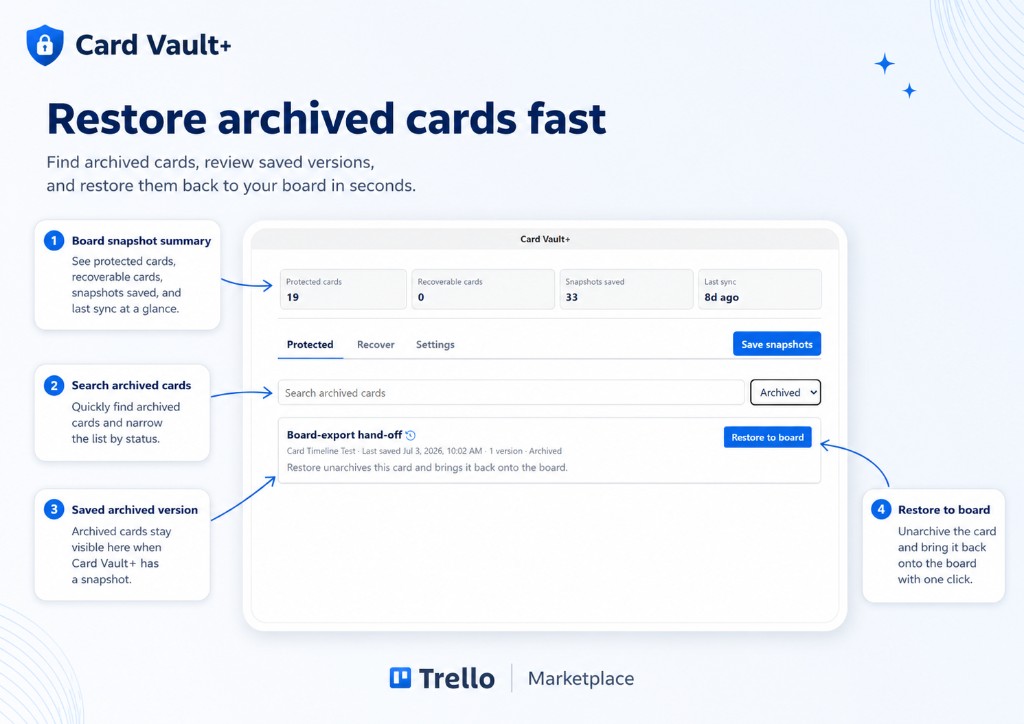
Restore archived card to board
Use when a card is archived in Trello but still exists on the board as an archived card.
- Card Vault+ unarchives the card and returns it to the board
- You restore from the last saved snapshot associated with that card
- Open this from the board dashboard Protected tab with the Archived filter
See also Board dashboard.
Restore preview flow
Before any restore, you review:
- Snapshot summary — what version you are restoring
- Fields to restore — name, description, due date, checklists, labels, etc.
- Destination list (recreate mode) — where the new card will be created
- Limitations — fields or labels that cannot be restored
- Confirmation checkbox — you must confirm before the restore runs
After restore
Card Vault+ shows a restore report listing:
- What was restored successfully
- What could not be restored (for example, a label that no longer exists on the board)
For recreate mode, Trello opens the new card. For update mode, refresh the existing card to see changes.
What restore cannot do
| Limitation | Reason |
|---|---|
| Undelete the original card object | Trello does not support true undelete — recovery creates a new card |
| Restore attachment file binaries | Only attachment metadata is stored |
| Restore to a deleted list | Choose an open list on the board |
| Restore labels that no longer exist | Missing labels are reported in the restore result |
Safety
- Always read the preview carefully before confirming.
- For update mode, the pre-restore snapshot lets you recover the previous live content if needed.
- Admins can restrict restore to board admins only — see Settings.